OJxvFq.jpg

老板给了个新的服务器,配置是:

  • CentOS 7.9 64位
  • 2核(vCPU)8 GiB

先从安装各种服务开始吧,先进入看看:

1
2
3
ssh root@x.y.z.n
root@x.y.z.n's password:
Welcome to Alibaba Cloud Elastic Compute Service !

先把网搞通:

1
2
3
4
5
6
7
8
9
yum install nginx

firewall-cmd --add-port=80/tcp --zone=public --permanent
firewall-cmd --add-port=443/tcp --zone=public --permanent
firewall-cmd --add-port=3306/tcp --zone=public --permanent
firewall-cmd --reload

netstat -anp | grep 80
systemctl start nginx

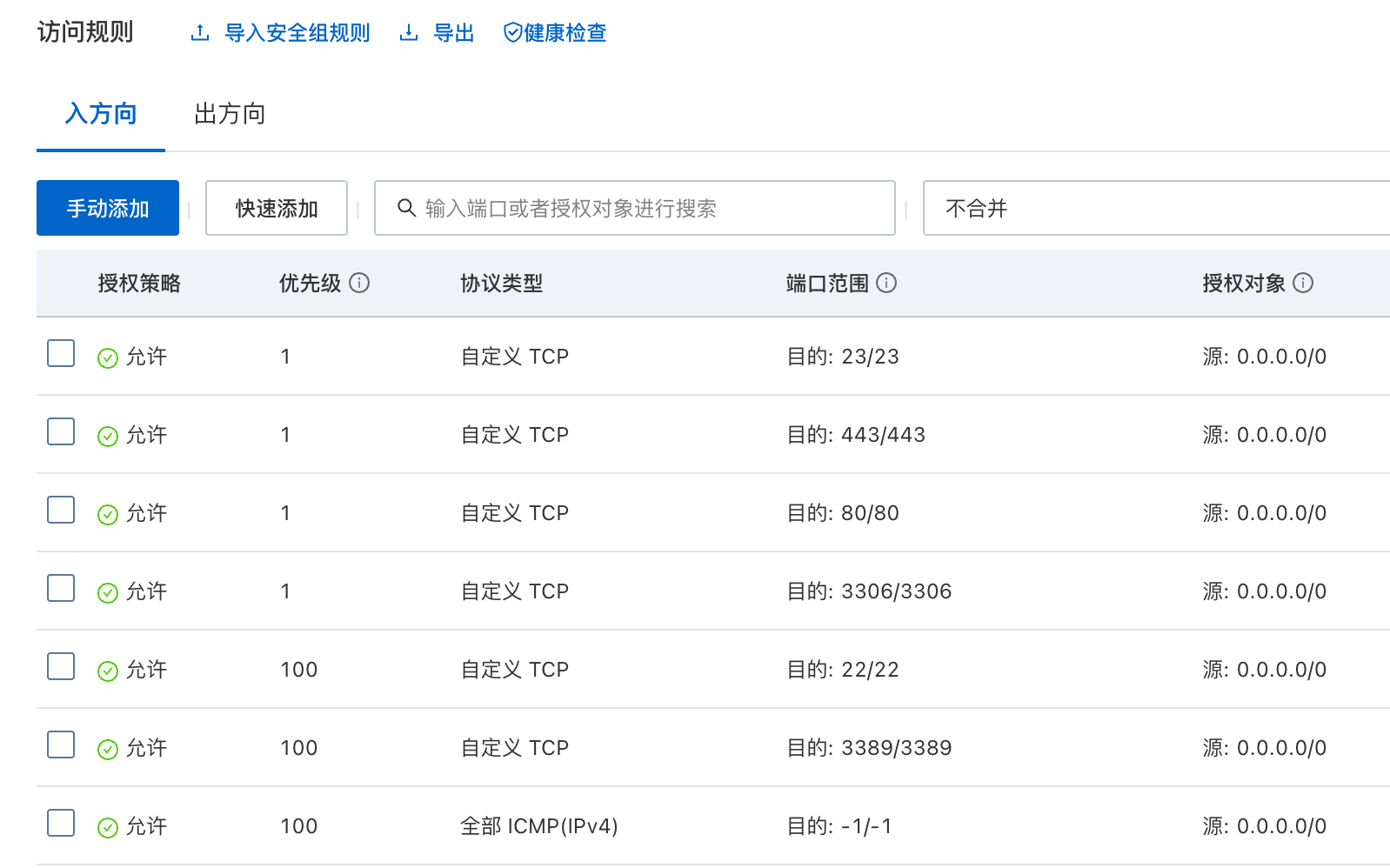
在阿里云控制台里加上安全组规则:

安全组

然后把项目拉下来放好,我直接都甩 www 下了

1
yum install git

前端项目

1
git clone https://e.coding.net/fftt1/shangbiaocrm/trademark_admin.git

依赖管理,用这个 Node.js 下载源之前试了一堆都不行。NRM 是 镜像源管理工具:

1
2
3
4
5
6
7
8
9
wget https://registry.npmmirror.com/-/binary/node/v16.16.0/node-v16.16.0-linux-x64.tar.gz
tar -zxvf node-v16.16.0-linux-x64.tar.gz
mv node-v16.16.0-linux-x64 /usr/local/nodeJS

npm install -g npm@8.17.0
npm install -g nrm
npm audit
# 不用整些什么 cnpm
npm config set registry https://registry.npm.taobao.org

然后用 Vue Cli 打包了,默认是生成到 ./dist 下:

1
2
npm install
npm run build:prod

把打包后的文件放在 /www/frontend/dist 下了,通过 rsync 命令移动:

1
rsync -avzP --delete ./dist/ ../frontend/dist/

后端项目

1
git clone https://e.coding.net/fftt1/shangbiaocrm/trademark_crm_api.git

搜了个 7.3 的安装:

1
2
3
4
5
6
7
8
9
10
11
12
13
14
# 必要
yum -y install gcc gcc-c++
# 安装和启用EPEL和Remi存储库
yum install https://dl.fedoraproject.org/pub/epel/epel-release-latest-7.noarch.rpm
yum install http://rpms.remirepo.net/enterprise/remi-release-7.rpm
# 管理(启用或禁用)yum存储库以及包的工具
yum -y install yum-utils
# 安装7.3
yum-config-manager --enable remi-php73
# 必要模块
yum -y install php php-mcrypt php-devel php-cli php-gd php-pear php-curl php-fpm php-mysql php-ldap php-zip php-fileinfo
# 打开fpm并开机启动
systemctl start php-fpm
systemctl enable php-fpm.service

接着装 Compoer:

1
2
3
4
5
curl -sS https://getcomposer.org/installer | php
mv composer.phar /usr/bin/composer
chmod u+x /usr/bin/composer
# 基本都用这个源了吧
composer config -g repo.packagist composer https://mirrors.aliyun.com/composer/

然后是 Laravel 的常规步骤:

1
2
3
4
5
6
7
8
9
10
composer install -vvv
cp .env.example .env
php artisan key:generate

chmod -R 0755 /www/trademark_crm_api/storage/
chmod -R 0755 /www/trademark_crm_api/public/
chown -R nginx.nginx /www/trademark_crm_api/

# 自己去改下具体配置
vim .env

额外服务

代码里用了 Redis,也装个:

1
2
3
yum install redis
service redis start
service redis status

忘了还没装 MySQL,补一个:

1
2
3
4
wget https://dev.mysql.com/get/mysql80-community-release-el7-2.noarch.rpm
yum -y install mysql80-community-release-el7-2.noarch.rpm
# 没加 --nogpgcheck 时报错
yum -y install mysql-community-server --nogpgcheck

这个时候还不知道它设的默认密码是啥,日志里搜一下:

1
grep "password" /var/log/mysqld.log

登录后改下密码,允许下远程登录的端口,之后的操作为了方便就在 DataGrip 里搞了

选择驱动时,普通 MySQL 一直连不上,要换亚马逊的这个
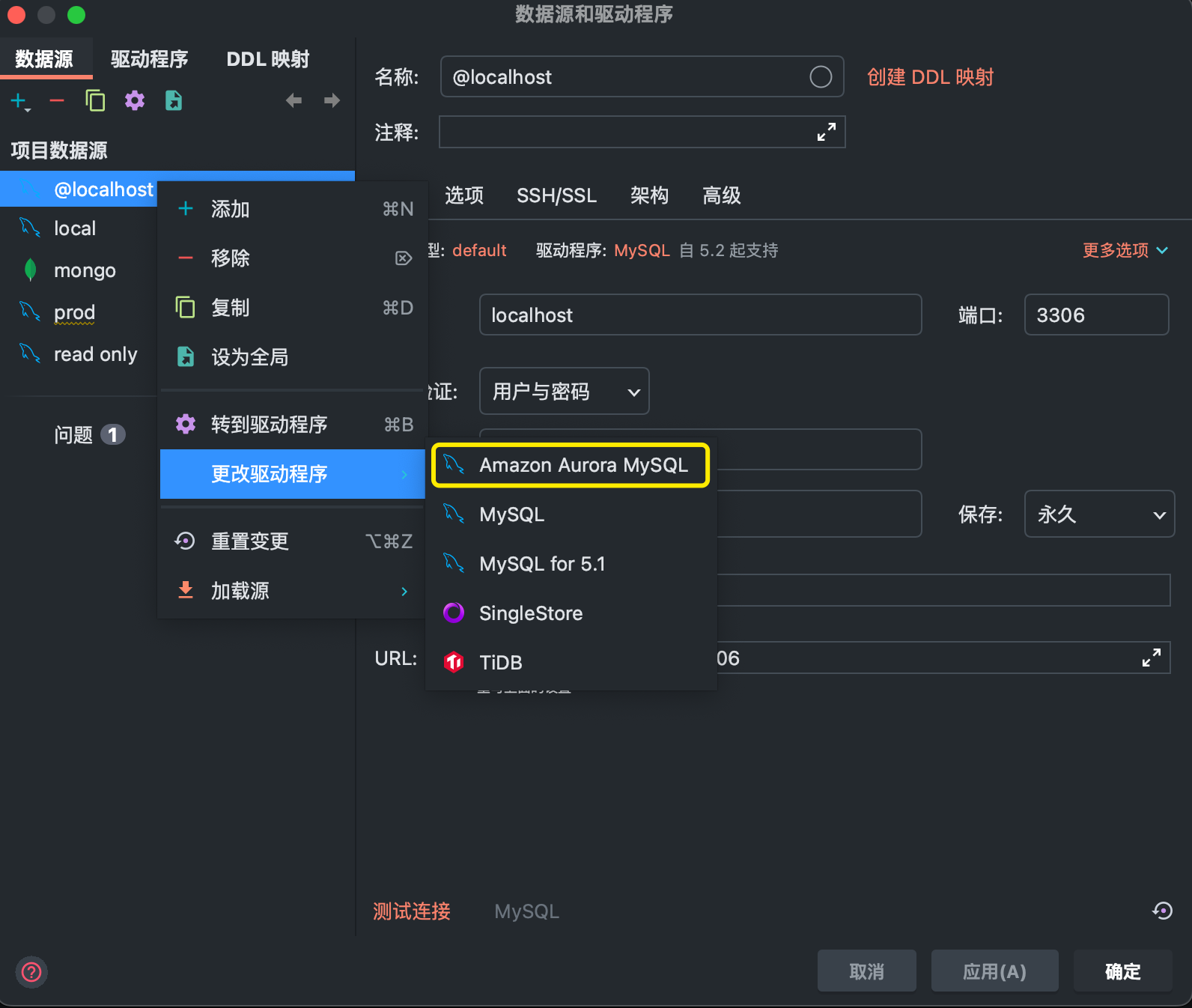
DataGrip驱动

运行 Laravel 的迁移,运行起来后发现时间不对,要改下:

1
2
3
4
5
6
7
cd /www/trademark_crm_api/
php artisan migrate

php -i
# 进去搜 date
vim /etc/php.ini
php -r "echo date('Y-m-d H:i:s');"

还有 Laravel 的配置文件里:

app.php
1
'timezone' => 'Asia/Shanghai',

反向代理

把 HTTPS 的证书安装好,并写入配置:

/etc/nginx/conf.d/frontend.conf
1
2
3
4
5
6
7
8
9
10
11
12
13
14
15
16
17
18
19
20
21
22
23
server {
listen 80;
server_name fs.shoptm.cn;
rewrite ^(.*)$ https://$host$1 permanent;
}
server{
listen 443 ssl;
ssl_certificate /soft/cert/fs.shoptm.cn.pem;
ssl_certificate_key /soft/cert/fs.shoptm.cn.key;
ssl_session_timeout 5m;
ssl_ciphers ECDHE-RSA-AES128-GCM-SHA256:ECDHE:ECDH:AES:HIGH:!NULL:!aNULL:!MD5:!ADH:!RC4;
ssl_protocols TLSv1 TLSv1.1 TLSv1.2;
ssl_prefer_server_ciphers on;
server_name fs.shoptm.cn;
root /www/frontend/dist/;
index index.html;
location /api {
proxy_pass http://localhost:81;
}
location / {
try_files $uri $uri/ /index.html;
}
}

后端项目配置,前端访问接口时在同级网址:

/etc/nginx/conf.d/trademark-api.conf
1
2
3
4
5
6
7
8
9
10
11
12
13
14
15
server{
listen 81;
root /www/trademark_crm_api/public;
index index.php;
location / {
try_files $uri $uri/ /index.php?$query_string;
}
location ~ \.php$ {
fastcgi_split_path_info ^(.+\.php)(/.+)$;
fastcgi_pass unix:/dev/shm/php-fcgi.sock;
fastcgi_index index.php;
fastcgi_param SCRIPT_FILENAME $realpath_root$fastcgi_script_name;
include fastcgi_params;
}
}

由于我后端项目路由都在 api.php 里,所以前端配置接口地址只需要 /api

.env.production
1
2
ENV = 'production'
VUE_APP_BASE_API = '/api'